
微信小程序语音转文字功能实战:从踩坑到上线
已完成开篇
最近产品经理又双叒叕提需求了:"咱们小程序加个语音输入功能呗,你看竞品都有!" 这种能提升用户体验的功能当然是很有必要的。但真做起来才发现,微信小程序的语音识别功能虽然封装得不错,但坑也不少。今天就把我趟过的坑和最终解决方案分享给大家。
准备工作:
别急着写代码
对于语音识别 ,微信小程序其实已经封装好了一个插件,那就是同声传译的插件。不过使用这个插件之前我们需要做一些准备工作:
1、插件授权
我们首先需要登录微信公众平台,在账号设置-第三方设置-插件管理中点击《添加插件》,搜索“同声传译”或者搜索插件AppId:wx069ba97219f66d99 并点击添加。(如果是个人小程序则无法使用这个插件,我们可以选择腾讯云语音识别能力,也是比较好用的,能满足基本使用)
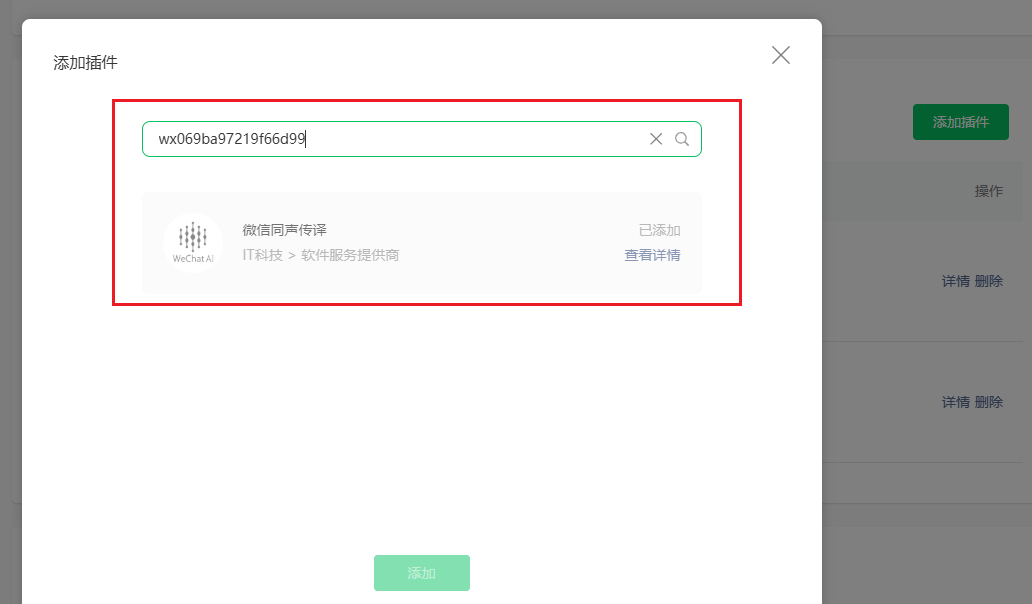
2、麦克风功能隐私协议添加
语音识别首先要获取录音权限,那我们需要在公众平台-基本设置-服务内容声明-用户隐私保护指引中添加录音功能,这个非常重要,需要微信官方审核,如果不开通的话,我们就不能使用录音功能了。
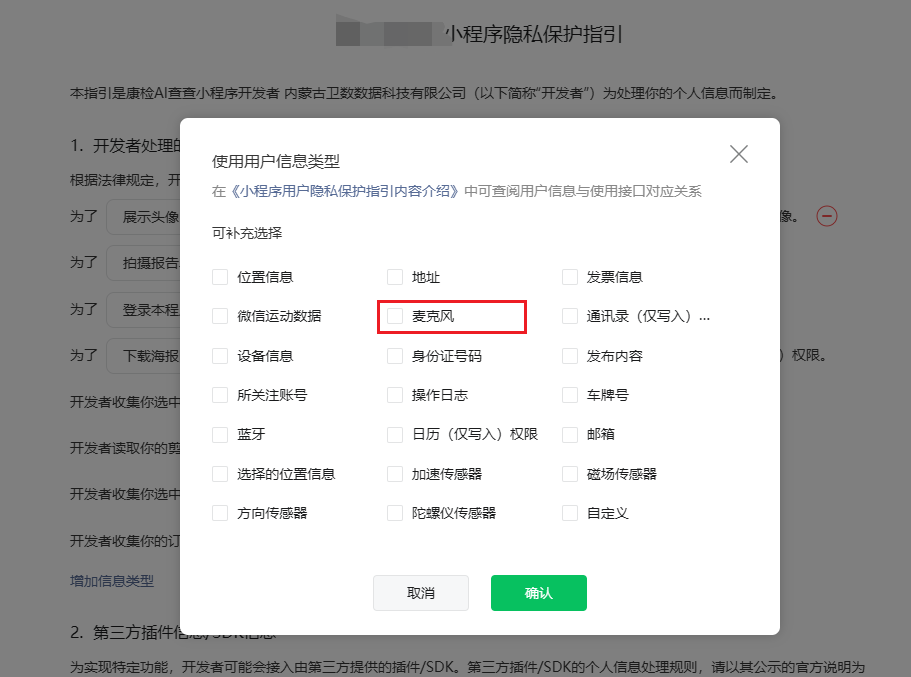
等待审核通过之后,我们就可以着手代码工作了。
代码配置
1. 插件配置
在app.json里加插件配置时,我一开始忘记加版本号,结果调试半天才发现问题:
// 正确姿势{"plugins": {"WechatSI": {"version": "0.3.4", // 这个千万不能少!"provider": "wx069ba97219f66d99"}}}2. 权限处理
用户拒绝授权时不能直接摆烂,得引导他们去设置页。这里有个细节:wx.openSetting现在必须由用户点击触发,不能直接在fail回调里调用了,得用弹窗中转:
getAuth() {wx.authorize({scope: 'scope.record',fail: () => {// 这个modal必须要有,不然openSetting不生效wx.showModal({title: '提示',content: '需要麦克风权限才能语音输入',success(res) {if (res.confirm) {// 用户点击确定后才能跳转设置wx.openSetting()}}})}})}核心代码
1. 识别管理器要全局单例
const manager = speekplugin.getRecordRecognitionManager()// 这个manager一定要放在Page外面!// 放里面会导致重复创建,识别结果会错乱
2. 三个回调必须全监听
| initRecord() { |
| // 实时结果回调(会触发多次) |
| manager.onRecognize = (res) => { |
| // 这里有个坑:res.result可能包含上次结果 |
| this.setData({ resultText: res.result }) |
| } |
| // 最终结果回调 |
| manager.onStop = (res) => { |
| // 实测有时候res.result比onRecognize的最后一次结果更准确 |
| this.setData({ |
| resultText: res.result, |
| recognizing: false |
| }) |
| } |
| // 错误回调(网络问题、说话太短等) |
| manager.onError = (res) => { |
| // 常见错误码: |
| // -10006:录音时间太短 |
| // -10007:录音时间太长(超过60s) |
| console.error('识别出错', res) |
| } |
| } |
3. 开始/结束录音
| // 开始录音 |
| startRecord() { |
| this.setData({ listening: true }) |
| manager.start({ |
| lang: 'zh_CN', |
| // 实测这个参数可以提升短语音识别准确率 |
| detectInterrupt: true |
| }).catch(err => { |
| // 这里要catch,不然用户拒绝授权时会崩 |
| console.error('启动录音失败', err) |
| }) |
| } |
| // 结束录音 |
| stopRecord() { |
| manager.stop() // 这个stop()没有回调,结果在onStop里拿 |
| // 注意:这里不能立即setData,要等onStop触发 |
| } |
过程中踩了一些坑记录一下
坑1:onRecognize结果重复
现象:实时回调返回的结果会包含之前识别的内容
解决方案:直接使用res.result而不是累加
| // 错误写法(结果会重复) |
| this.setData({ resultText: this.data.resultText + res.result }) |
| // 正确写法 |
| this.setData({ resultText: res.result }) |
坑2:安卓机权限问题
现象:安卓机上有时授权成功了但还是无法录音
解决方案:加个延迟再启动录音
wx.authorize({scope: 'scope.record',success: () => {// 安卓机需要稍微等一等setTimeout(() => {manager.start({/*...*/})}, 300)}})坑3:长时间录音卡顿
现象:录音超过30秒后识别变慢
解决方案:建议分段识别,每60秒自动分段(微信限制最长60s)
| // 录音计时 |
| let recordTimer = null |
| startRecord() { |
| this.setData({ listening: true }) |
| manager.start({/*...*/}) |
| // 60秒自动停止 |
| recordTimer = setTimeout(() => { |
| this.stopRecord() |
| }, 60000) |
| } |
| stopRecord() { |
| clearTimeout(recordTimer) |
| // ...原有逻辑 |
| } |
完整代码优化版
| const speekplugin = requirePlugin("WechatSI") |
| const manager = speekplugin.getRecordRecognitionManager() |
| let recordTimer = null |
| Page({ |
| data: { |
| resultText: '', |
| listening: false, |
| recognizing: false, |
| errorMsg: '' |
| }, |
| onLoad() { |
| this.getAuth() |
| this.initRecord() |
| }, |
| // 权限处理(优化版) |
| getAuth() { |
| wx.getSetting({ |
| success: (res) => { |
| if (!res.authSetting['scope.record']) { |
| wx.authorize({ |
| scope: 'scope.record', |
| fail: () => this.showAuthModal() |
| }) |
| } |
| } |
| }) |
| }, |
| showAuthModal() { |
| wx.showModal({ |
| title: '需要麦克风权限', |
| content: '用于语音输入功能', |
| success: (res) => { |
| if (res.confirm) wx.openSetting() |
| } |
| }) |
| }, |
| // 识别初始化(防抖版) |
| initRecord() { |
| manager.onRecognize = (res) => { |
| this.setData({ resultText: res.result }) |
| } |
| manager.onStop = (res) => { |
| clearTimeout(recordTimer) |
| this.setData({ |
| resultText: res.result || this.data.resultText, |
| listening: false, |
| recognizing: false |
| }) |
| } |
| manager.onError = (res) => { |
| clearTimeout(recordTimer) |
| this.setData({ |
| errorMsg: this.getErrorMsg(res.retcode), |
| listening: false, |
| recognizing: false |
| }) |
| } |
| }, |
| // 开始录音(安全版) |
| startRecord() { |
| this.setData({ |
| listening: true, |
| errorMsg: '', |
| resultText: '' |
| }) |
| setTimeout(() => { |
| manager.start({ |
| lang: 'zh_CN', |
| detectInterrupt: true |
| }).catch(err => { |
| this.setData({ |
| listening: false, |
| errorMsg: '启动录音失败' |
| }) |
| }) |
| recordTimer = setTimeout(() => { |
| this.stopRecord() |
| }, 60000) |
| }, 300) |
| }, |
| // 结束录音 |
| stopRecord() { |
| manager.stop() |
| this.setData({ recognizing: true }) |
| }, |
| // 错误码转文字 |
| getErrorMsg(code) { |
| const map = { |
| '-10006': '说话时间太短', |
| '-10007': '说话时间超过60秒', |
| '-10001': '网络错误', |
| 'default': '识别失败,请重试' |
| } |
| return map[code] || map.default |
| } |
| }) |
最后总结
这个功能上线后用户反馈还不错,但有几个小建议:
一定要加个"正在聆听"的动画反馈,不然用户不知道麦克风开了没
识别结果可以加个编辑功能,毕竟语音识别不可能100%准确
安卓机的兼容性测试要重点做,特别是各种国产机型

回帖 ( 0 )